


















Dynamics GP to Business Central Migration: Moving Your ERP to the Cloud
Future fitness requires companies to assess their existing operating models and explore ways to evolve by bringing system-level changes.
A good computing infrastructure is no longer just a network of devices to log transactions, manage data, and generate reports. Instead, in this AI era, applications are integrated with AI, analytics, machine learning, Copilot, agentic AI, automation, with cloud architecture that collectively enable unified data and automated workflows.
These new computing infrastructures with integrated intelligence give businesses the ability to reimagine, innovate, and scale with confidence. Decisions are made faster, operations get efficient, and the benefits keep increasing.
“Companies with high ‘Future FITness‘ displayed +33% in profitability, +200% higher market capitalization growth, and 44% turned out to be the best outperformers in their industry cluster,” says a study.
In short, reinventing by leveraging megatrends brings resilience. Migration is not a need, but an urgency for those using legacy systems.
This is exactly the case with businesses using traditional ERP systems. The market is witnessing migration from Dynamics GP to Business Central, Microsoft’s cloud-enabled business management platform. Reports indicate that 20-30% are gaining productivity and revenue from adopting AI-enabled ERP systems.
If your business is already using Dynamics GP and the platform is no longer keeping up with your customer needs or limiting your operational ability, then this article is for you.
This blog sheds light on how businesses can migrate easily from Microsoft Dynamics GP to Dynamics 365 Business Central. With complete guidance on the limitations of Dynamics GP, there are sections outlining the benefits of a modern, scalable, and cloud-enabled ERP platform. Additionally, there is a comparison of both solutions, with an explanation of the migration process, highlighting common migration challenges and their solutions, and outlining how Business Central supports industry-specific operations across manufacturing, retail, logistics, BFSI, healthcare, and other sectors.
The blog also shares key considerations for selecting the right Dynamics GP to Business Central migration service provider to ensure a smooth transition, minimal business disruption, and long-term business value.
Why are businesses moving from Dynamics GP to Business Central?
The need to adapt to the changing business dynamics and the need to cater to the demand for personalized experiences, proactive operations, and real-time decision-making requires businesses relying on older ERP systems to migrate, which will allow them to manage data, perform interoperable workflows, analyze, and make themselves fit for the future.
One of the most deployed enterprise resource planning (ERP) systems, Microsoft Dynamics GP, formerly Great Plains, has been in the industry for more than three decades, supporting small and medium-sized businesses. The ERP is used for financial management, purchasing, inventory, manufacturing, project accounting, payroll, reporting, and other core business processes.
Dynamics GP is now approaching end of life, making migration planning increasingly important for organizations still using the platform. The best option is to opt for Business Central migration services.
Business Central is an advanced AI-powered, cloud-enabled business management platform with features to manage finance, sales, purchasing, inventory, manufacturing, product and service operations, and all projects under a single system. As part of the Microsoft ecosystem, the platform easily syncs with Microsoft 365, Power Platform, and Power BI.
IDC defines Intelligent ERP as those that integrate machine learning and advanced analytics.
As a leader in legacy systems modernization, SHALIGRAM helps businesses with structured migration methodology to transform from Dynamics GP to Business Central.
Dynamics GP vs. Business Central
| Microsoft Dynamics GP | Dynamics 365 Business Central | |
| Deployment | On premises | Cloud and supported on-premises deployment options |
| Current status | Maintenance and countdown mode. Mainstream support officially ends on December 31, 2029. Final security updates completely terminate on April 30, 2031. | Actively evolving platform. Microsoft’s primary mid-market ERP solution. The product undergoes two major automated functional updates every year. |
| Artificial intelligence | Completely zero native AI. GP has absolutely no AI roadmap, and Microsoft has clearly indicated that it will not add any future automation capabilities to the legacy platform. | Built-in Microsoft Copilot. Integrated AI automation, automatically suggesting drafting, and predicting inventory or purchase-related workflows. |
| Licensing impact | Fixed/Restricted. New customer licenses are not encouraged. For existing users renting GP via SPLA subscription agreements, the software will completely be shut down on April 30, 2031. | Flexible SaaS Subscription. Easily scalable per-user pricing model managed natively through the standard Microsoft 365 cloud environment. |
| User experience & access | Desktop-based interface | Modern, browser-based web interface, with mobile access, with embedded Microsoft Copilot AI. |
| Reporting & integration | Batched and disconnected reports. Requires manual data syncing, separate custom integrations, or third-party add-ons to generate reports. | Native, real-time ecosystem. Instant, open APIs seamlessly connect with the Power Platform and Microsoft 365. |
| Access | Restricted and on-premises only. Dependent on physical Windows servers or private cloud hosting. Users can log in through VPNs or via desktops. | Cloud-native, either from a private cloud setup, or a local server, from anywhere via an internet browser, mobile app, with standard Microsoft 365 single sign-on. |
| Functionality | Supports core ERP functions like finance, purchasing, payables, inventory, and reporting. | Supports easy management of finance, sales, purchasing, inventory, manufacturing, product and service operations, and via extensions through the Microsoft ecosystem. |
Understanding Dynamics GP to Business Central migration
Dynamics GP to Business Central migration is a process that not only involves the transformation of financial records but also covers the entire transition of your business ERP data, configurations, operational structure, and integrations from Dynamics GP to Microsoft Dynamics 365 Business Central.
Before migrating, it is critical for businesses to decide which data to retain, what customizations to carry forward, what type of reports are required, along with integrations with other business applications.
A reliable Business Central migration services provider will be able to guide you through a smooth cloud migration process and move data from on-premises Dynamics GP environments to Business Central.
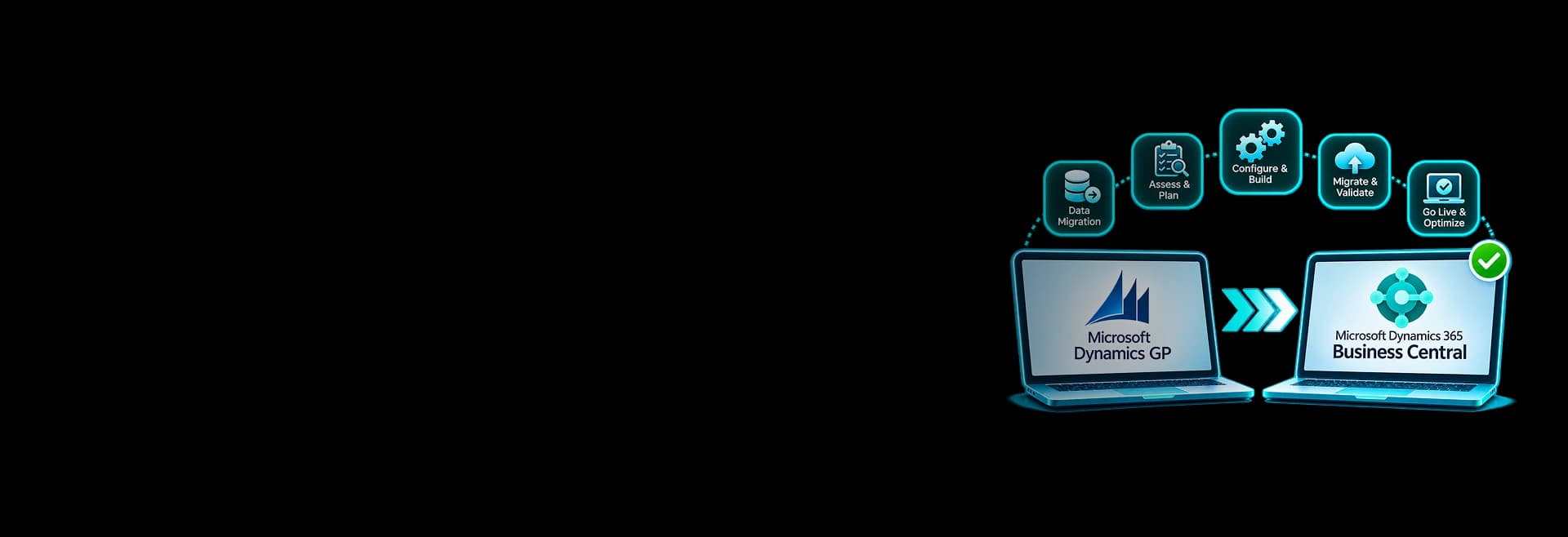
SHALIGRAM’s Business Central migration processes include assessment, preparation, data replication, data upgrade, validation, and support.
What data can be migrated from Dynamics GP to Business Central?
The instinct is to migrate every data element across. Depending on the configuration and supported data structures, the following type of data can be migrated from Dynamics GP to Business Central.
- Financial data: Chart of accounts, general ledger balances, fiscal periods, and financial transaction summaries.
- Fiscal periods: Calendar and accounting periods data.
- Customer data: Customer master records, contact details, addresses, payment terms, and outstanding receivables.
- Vendor data: Vendor records, payment information, 1099 details, and outstanding payables.
- Inventory data: Item master records, descriptions, costing methods, inventory quantities, locations, serial numbers, and lot numbers.
- Sales and purchase data: Open purchase orders, outstanding sales and purchasing transactions, and related customer and vendor information.
- Banking data: Bank account records, checkbook information, and unreconciled bank transactions.
- Company and system setup: Payment terms, shipping methods, sites, and other company configurations.
- Master data: General ledger accounts, customers, vendors, and inventory items.
- Transactional data: Supported financial and operational transactions.
- Classification data: Customer, vendor, and item classes.
- Historical data: Supported historical records required for business reference and reporting.
- Tax-related information: Tax and other deductions-related data.
On a realistic note, confirm your migration scope before implementation. Not every element of your Dynamics GP will automatically transfer. This is where businesses will require a reliable migration partner.
What needs to be redesigned before migration?
It is to be understood that moving data does not move the entire GP environment. Practically, several components require re-assessment, re-designing, and re-development.
- Customizations: GP-specific custom code and modifications.
- Third-party applications: It is critical to check existing add-ons for Business Central compatibility or replaced.
- Reports: Custom reports and dashboards will have to be rebuilt using Business Central reporting, Power BI, or other tools.
- Integrations: Connections with other tools like CRM, payroll, banking, e-commerce, and warehouse need to be reviewed and reconfigured.
- Business workflows: Approval processes, automated tasks, and operational procedures will have to be redesigned.
- Stacked records: Organizations must determine which records should be migrated, archived, or retained in a separate environment.
The key is to distinguish between what can be migrated, what must be configured, and what needs to be rebuilt. This prevents businesses from assuming that their existing GP environment will be reproduced automatically in Business Central.
Benefits of Dynamics GP to Business Central migration
Modern ERP
Better business visibility and reporting
Connect finance with business functions
Automate workflows
Access other Microsoft ecosystem solutions
AI-enabled business management
Dynamics GP to Business Central migration processes
A successful migration from Dynamics GP to Business Central starts by partnering with a legacy modernization service provider. The company should will understand your existing ERP environment, plan, prepare data for migration, work on integrations and customizations, and validate to have a smooth deployment. Although the processes seem to be overwhelming, a reliable migration partner will help in successfully migrating your ERP environment.
Key steps in ERP migration:
- Assess your existing Dynamics GP environment
- Define migration goals and scope
- Choose the right migration approach
- Prepare Business Central architecture and configuration
- Clean, map, and migrate data
- Test business processes and validate data
- Train users and share documentation
- Monitor and optimize the new ERP
Top recommendations from Microsoft and ERP experts about Dynamics GP migration
The expert guidance points toward a common principle: organizations should treat ERP migration as a business transformation project, not just a database transfer.
Assess before migrating
In Microsoft’s July 28, 2026, migration guidance for Dynamics NAV, GP, and SL customers, the company recommends working with a Microsoft partner to assess the existing ERP environment.
Focus on modernization for long-term value
Mike Morton, Microsoft’s Vice President of Dynamics 365 Customer Experience, highlighted Business Central as a platform for bringing finance, sales, project management, manufacturing, and supply chain capabilities together. He also emphasized using AI capabilities and reducing technical debt when moving from Dynamics GP and other on-premises ERP systems.
Migration is a complex growth initiative
In a March 2026 article, Lilian Buitrago, writing on Microsoft’s partner resource site, described on-premises-to-Business-Central migration as a high-impact but complex opportunity for partners. It also points towards total-cost-of-ownership calculations to help businesses understand the case before committing.
Common Dynamics GP to Business Central migration challenges: How to overcome them
Transitioning from GP to Business Central requires careful planning. The process will have a few challenges, and here you can find out how to overcome them.
1. Migration costs and unclear project scope
The cost of migration can increase when organizations plan customizations and complex integrations during the migration process. Moreover, poor data quality or additional requirements during implementation may increase the cost. To overcome this challenge, it is critical to have a detailed scope after assessing the existing GP environment. Keep an additional budget for migration, customization, integration, licensing, training, and ongoing support costs. Prioritize features that are critical for your business.
2. Customization and third-party application compatibility
Organizations often rely on GP-specific customizations, add-ons, and integrations built around years of operational requirements. These may not be compatible with Business Central. The best way to overcome this challenge is to document every customization and integration, identify its business purpose, and determine whether standard Business Central functionality can replace it.
3. Business disruption and downtime risks
A poorly planned cutover can interrupt invoicing, purchasing, order processing, inventory management, and financial reporting. Even short interruptions can affect customer commitments and daily operations. You can easily overcome this challenge by having a detailed cutover plan, defining a data freeze period, testing the migration in advance, and establishing rollback and contingency procedures.
4. Complex data migration and data quality issues
Legacy ERP databases may contain duplicate customer records, inactive vendors, inconsistent item codes, and incomplete transaction details. These issues can create mapping errors and inaccurate reports in the new system. To overcome this, conduct data profiling before migration, establish field-mapping rules, remove duplicate records, and perform multiple test migrations.
5. Security, compliance, and access management
Moving ERP data to a cloud environment introduces new considerations around identity management, permissions, data access, and regulatory requirements. Poorly configured roles can expose sensitive financial or business information. To overcome this, it is critical to define role-based access controls, review user permissions, configure appropriate security policies, and validate audit and compliance requirements.
6. Skill gaps and resistance
Employees will not be familiar with the new platform and workflows. This can slow down adoption and affect productivity. To overcome this, it is critical to involve key users early, offer training, document user guides, and identify an in-house expert to support during the transition period.
Latest Microsoft Business Central developments to consider before migrating
A Dynamics GP migration should consider far more than the current feature set. Businesses should evaluate where Microsoft is investing in the Business Central platform and how those developments could influence their future ERP strategy. Here are a few upcoming and recently released capabilities in Dynamics 365 Business Central that will support your decision to migrate to Business Central.
Dynamics GP support deadline
Microsoft has set the deadline as December 31, 2029, for Dynamics GP product enhancements, updates, and technical support. Security updates and patches will be made available only until April 30, 2031.
This does not indicate any force on businesses using this platform to migrate immediately. However, businesses should budget for modernization and plan a controlled transition rather than wait until support ends.
Business Central 2026 release wave 2: AI at work roadmap
AI at Work roadmap transition: Traditional release plans will be retired soon; users will be able to track new and upcoming features directly via the AI at Work roadmap. Bringing all information about new updates under one page means users can see Dynamics 365, Microsoft Power Platform, and Microsoft Dataverse roadmap content in one view, filter and plan across products.
More focus on AI agents
Microsoft Dynamics 365 Business Central 2026 release wave 2, update 29.0, includes multiple enhancements in Copilot, AI agents, and platform integration features.
New capabilities include:
- Copilot chat: A public preview of the Microsoft Copilot chat experience.
- Dataverse integration: Support for mapping new Dataverse fields.
- Agent permissions: Easier management of permissions for agents.
- Centralized agent task management: A dedicated task pane for managing tasks from different agents.
- Payables agent improvements: Enhancements to purchase order matching; to include inline amount.
For businesses planning a GP migration, these developments highlight the value of transforming into connected workflows and AI-assisted ERP operations.
How to choose the right Dynamics GP to Business Central migration partner
Whether you are migrating from Dynamics GP to Microsoft Dynamics 365 Business Central or going for a fresh implementation of an ERP system, it is critical to choose the right migration partner. Picking the right migration partner is a huge challenge considering the list of service providers available globally. An experienced implementation service provider will be able to identify the risks, protect your business data, ensure minimal disruption, and facilitate the new ERP to support long-term business objectives.
Here are a few tips to choose the right migration partner for a Dynamics GP to Business Central migration:
1. Microsoft Dynamics GP and Business Central expertise
The migration partner that you shortlist should have hands-on experience in both Dynamics GP and Business Central. The identified partner should understand your GP modules, database patterns, customizations, and a thorough knowledge of the two platforms.
2. Migration assessment and planning capabilities
Only the best migration service provider will be able to assess your existing ERP environment before recommending a migration strategy. By evaluating your business’s data quality, customizations, and integrations, the migration service provider should be able to plan with all capabilities.
3. Expertise in data migration and integration
The provider should have expertise in managing data mapping, phased migration, testing, reconciliation, and integration with third-party applications.
4. Customization and application development
Your shortlisted migration partner should be able to bring all GP customizations to standard Business Central and suggest those that require extensions or application development.
5. Data security and governance
Your sensitive business information should be handled well during migration. Only an experienced service provider will be able to manage data governance, audit requirements, compliance, and conduct AI-driven security testing.
6. Post-migration maintenance
Choose a partner with the support capability to monitor, optimize, and maintain the new environment to sustain performance.
Why choose SHALIGRAM for Dynamics GP to Business Central migration?
The success of any migration project depends on the way it is executed. Research reports indicate that nearly 50-55% of migration projects fail due to poor execution. SHALIGRAM is well-recognized as the right ERP (Enterprise Resource Planning) migration partner. We are well-known for our consulting-first approach. This includes assessing your existing systems, identifying migration scope, and planning a smooth migration aligned with your long-term goals. Upon mutually agreeing to the plans, SHALIGRAM initiates the migration process.
Our approach includes;
- ERP assessment and migration planning
- Data migration and validation
- Business Central implementation
- Customization and integration
- Testing and user enablement
- Ongoing support and maintenance
Whether you need a migration, hybrid modernization approach, or a complete ERP reengineering, SHALIGRAM’s team of experts will plan systematically.
Conclusion
Dynamics GP to Business Central migration is not just about an ERP replacement. It is a chance for businesses to modernize their operations.
The fact is that Microsoft is ending Dynamics GP. The product is no longer sold. Users will soon experience the end of its technical support by 2029, and final security updates in 2031. This clearly indicates the need to migrate to another product. Business Central is already trusted by over 55,000 small and midsize companies for its AI-powered enterprise resource planning capabilities with both cloud and on-premises hosting options.
For businesses, migrating from Dynamics GP to Business Central is a wise decision as it provides a stronger foundation for long-term ERP performance, cloud hosting, AI-driven workflows, and scalability with evolving business requirements. As a reliable partner, SHALIGRAM has both industry- and country-specific expertise in Microsoft development services, to help you migrate easily from Dynamics GP to Business Central, along with implementation and training support.

Wondering how to migrate from Dynamics GP to Business Central?
SHALIGRAM is here to help you have a smooth migration saving both cost and time.
FAQs
Migrating from Dynamics GP to Business Central typically takes 3-9 months, depending on the complexity.